|
Table of Content
1.Create card information for bank and non-bank lenders
2.Create account number and loan details where the lender is financial institution
oBank account number
oBank loan detail
3.Create current year's new bank and non-bank term loan
4.Create opening balance for brought forward loans for first time adoption of plug-in
5.Loan plug-in and use of amortization tool
Create card information
Bank
1.Select menu Cards.
2.Complete the bank information below.
.jpg)
Non-bank lenders
1.Select menu Cards.
2.Complete non-bank lenders information.
Diagram 2: Create Card Information for vendor
.jpg)
Create account number and loan details where the lender is financial institution
Bank account number
1.At main menu,select Cards> Bank.
2.Click on the bank radio box, and click Create Account Number.
.jpg)
3.Select your type of facility (for example, Hire Purchase) and key in account number.
.jpg)
Bank loan detail
1.At main menu,select Cards> Bank.
2.Click on the bank radio box, and click Create Loan Detail.
.jpg)
3.Enter bank facilities detail below and click on Add/Update Record.
.jpg)
Create current year's bank and non-bank term loan (new release)
1.Loans and FD plug-in> Term loan I (unexpired interests)
2.You are required to create the sub lead schedule page.
.jpg)
3.Click on Edit icon to create new term loan item.
4.Fill in the loan information at the diagram below and click submit button.
.jpg)
4.After that, click edit button and enter current year payment detail.
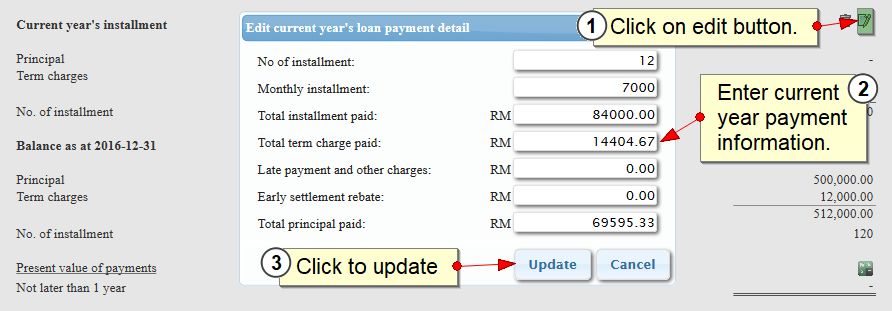
4.Click update button.
Create opening balance for brought forward loans for first time adoption of plug-in
You have to adjust the opening balance of the loan if the date of purchase of the asset is on previous year.
Steps
1.Click edit button to perform reconciliation to closing balance amount of the previous year.
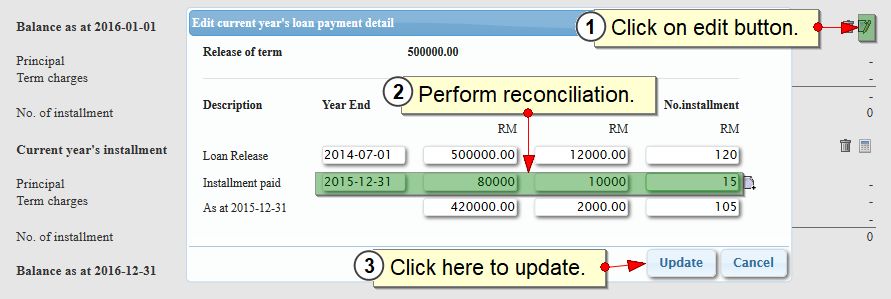
2.Click update button to save changes.
Loan plug-in and use of amortization schedule tool
1.Now click on amortization icon.
.jpg)
2.Tick monthly check box to enable amortization schedule by monthly basis, and click update record to save changes.
.jpg)
|