|
Create New Company
Introduction
You have to create a database for each client for the first time. The client database can be reused for unlimited year end.
Create new companies
1.Go to menu Admin> Company database> Create new company.
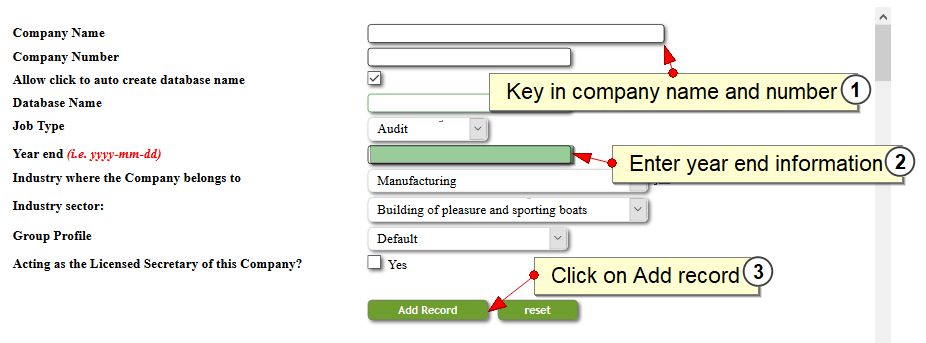
2.Key in your company name, company number and the latest year end of the company.
3.Define which group profile the company belongs to, if applicable.
4.Click on Add Record.
5.If you intend to start working on the new-created company, you have to visit menu system> change company to switch company.
Edit companies
1.Go to menu Admin> Company database> Create new company.
2.Scroll to bottom section of the page.

3.Click on the edit button to edit database.

4.Click Update Name List to save changes.
Delete companies
1.Go to menu Admin> Company database> Create new company.
2.Scroll to bottom section of the page.
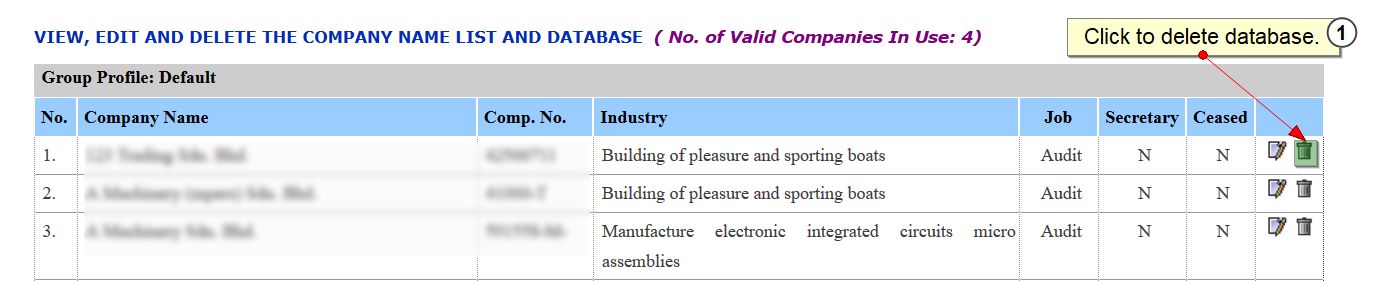
3.Click on the dustbin icon to delete database.
|